Webhook Security & Reliability
Security
Review the security threats to consider when operating a public endpoint for receiving Webhook messages, and apply the best practices proposed by the Nodit team to minimize those threats.
Security Threats
Replay Attacks
A replay attack is a security threat in which an attacker intercepts the same request and retransmits it multiple times, triggering unintended duplicate processing or malicious behavior. For example, if the same Webhook message is delivered repeatedly by an attacker, payment requests or data update requests may be processed multiple times, causing unnecessary load on the system or breaking data consistency. To prevent this, implement your business logic to process received Webhook messages in an idempotent manner.
Man-In-The-Middle (MITM) Attacks
A man-in-the-middle attack is a threat in which an attacker intercepts communication between a client and server to eavesdrop on data or tamper with the message payload. You can minimize this threat by using encrypted communication protocols such as HTTPS/TLS to protect the communication channel itself, and by additionally performing signature verification to authenticate the message's integrity and origin.
Best Practices
Following the security guidelines below from Nodit helps minimize security threats such as replay attacks and MITM attacks, and provides a safer service environment for your users. Each recommendation is optional and can be selectively applied to strengthen security.
Verifying Message Integrity Using Signatures
The Nodit server includes a signature value in the x-signature header of every Webhook message request. The endpoint server can verify the integrity and origin of each message by using the Signing Key — which is visible at the time the Webhook is created — to validate the signature, as described in the guide below.
What is a Signature?
A signature is a value generated by hashing the original data you want to protect from tampering in transit using an algorithm such as HMAC-SHA256, and then creating a Message Authentication Code (MAC) using a pre-shared secret key. If the sender and receiver have exchanged a key in advance, the following signature verification process enables data integrity validation and sender authentication.
- The sender transmits the original data along with the signature to the receiver.
- The receiver decrypts the signature using the pre-obtained secret key to retrieve the digest plaintext (the hash result) generated by the sender. By confirming that decryption succeeds, the receiver can authenticate that the sender is the entity with whom the key was exchanged.
- The receiver performs a hash operation on the received original data to generate a digest.
- Based on the properties of hash operations, the receiver compares the sender's digest plaintext obtained in step 2 with the digest generated in step 3 to confirm that the original data has not been altered since it was sent.
Retrieving the Signing Key
The Signing Key is generated when a Webhook is created or registered, and the same key is used to sign all messages within the same Webhook identified by its Webhook ID (subscriptionId). Depending on how the Webhook was created, you can retrieve the generated Signing Key as follows.
(1) Viewing the Signing Key in the Console
In the Nodit Console's Webhook menu, click the [Signing Key] button as shown below to view the Signing Key used for each Webhook.
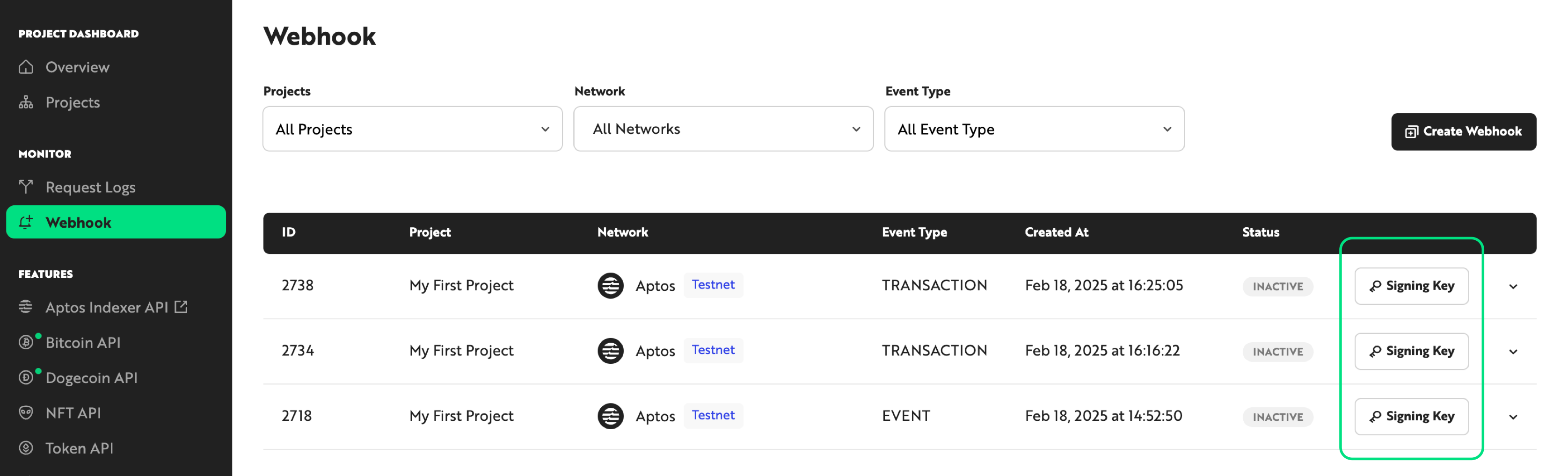
(2) Retrieving It from the Webhook Creation API Response
The signingKey field is included in the response for a successfully created Webhook when calling the Webhook creation API. The Signing Key is only available via the API at the time of initial Webhook creation and cannot be retrieved through subsequent information query APIs, so save it at creation time if needed.
Validating Nodit Webhook Message Signatures
When receiving a Nodit Webhook message via an HTTP request, extract the signature value delivered in the x-signature header and validate it through the verification process described above. Below are example code snippets by language for implementing signature validation.
const crypto = require('crypto');

/**
 * Validate the signature using the request body, header signature, and signing key.
 *
 * @param {Object} body - The request body (JSON object)
 * @param {string} signature - The signature string from the header
 * @param {string} signingKey - The message signing key used for signing
 * @returns {boolean} Returns true if the signature is valid, otherwise false
 */
function isValidSignature(body, signature, signingKey) {
  const hmac = crypto.createHmac('sha256', signingKey);
  hmac.update(JSON.stringify(body), 'utf8');
  return signature === hmac.digest('hex');
}

// --- Sample Data and Execution Example ---

// Example request body
const sampleBody = {
  "subscriptionId": "1",
  "sequenceNumber": "1",
  "description": "Signature Test",
  "protocol": "APTOS",
  "network": "TESTNET",
  "subscriptionType": "WEBHOOK",
  "notification": {
    "webhookUrl": "YOUR_WEBHOOK_ENDPOINT"
  },
  "eventType": "EVENT",
  "event": {
    "eventType": "0x13a9f1a109368730f2e355d831ba8fbf5942fb82321863d55de54cb4ebe5d18f::just::RandomIndexEvent",
    "eventAccountAddress": "0x0",
    "messages": [
      {
        "guid": {
          "creation_number": "0",
          "account_address": "0x0"
        },
        "sequence_number": "0",
        "type": "0x13a9f1a109368730f2e355d831ba8fbf5942fb82321863d55de54cb4ebe5d18f::just::RandomIndexEvent",
        "data": {
          "price": "44289819"
        },
        "event_index": 2,
        "version": "6627015772"
      }
    ]
  },
  "createdAt": "2025-02-18T05:52:53.559342615Z"
};
const signature = "da5eedb3f1fa386e095dc4f66a8f21155d22964633e0e6f844c331296ef1abaa";
// Example signing key (should be securely managed in production)
const signingKey = '7b8664b96de828e3b3bacf538c51e0ddcfa4fa6c686e738d8c0aeff5c8545ae7';

// Print the computed hash for debugging purposes
const hmac = crypto.createHmac('sha256', signingKey);
hmac.update(JSON.stringify(sampleBody), 'utf8');
console.log(hmac.digest('hex'));

// Execute the validation logic
if (isValidSignature(sampleBody, signature, signingKey)) {
  console.log('Signature is valid.');
} else {
  console.log('Signature is invalid.');
}
import json
import hmac
import hashlib

def is_valid_signature(body, signature, signing_key):
    """
    Validate the signature using the request body, header signature, and signing key.

    :param body: The request body (JSON object)
    :param signature: The signature string from the header
    :param signing_key: The message signing key used for signing
    :return: Returns True if the signature is valid, otherwise False
    """
    # Generate JSON string without unnecessary whitespace
    message = json.dumps(body, separators=(',', ':')).encode('utf-8')
    computed_signature = hmac.new(signing_key.encode('utf-8'), message, hashlib.sha256).hexdigest()
    return signature == computed_signature

if __name__ == '__main__':
    sample_body = {
        "subscriptionId": "1",
        "sequenceNumber": "1",
        "description": "Signature Test",
        "protocol": "APTOS",
        "network": "TESTNET",
        "subscriptionType": "WEBHOOK",
        "notification": {
            "webhookUrl": "YOUR_WEBHOOK_ENDPOINT"
        },
        "eventType": "EVENT",
        "event": {
            "eventType": "0x13a9f1a109368730f2e355d831ba8fbf5942fb82321863d55de54cb4ebe5d18f::just::RandomIndexEvent",
            "eventAccountAddress": "0x0",
            "messages": [
                {
                    "guid": {
                        "creation_number": "0",
                        "account_address": "0x0"
                    },
                    "sequence_number": "0",
                    "type": "0x13a9f1a109368730f2e355d831ba8fbf5942fb82321863d55de54cb4ebe5d18f::just::RandomIndexEvent",
                    "data": {
                        "price": "44289819"
                    },
                    "event_index": 2,
                    "version": "6627015772"
                }
            ]
        },
        "createdAt": "2025-02-18T05:52:53.559342615Z"
    }
    signature = "da5eedb3f1fa386e095dc4f66a8f21155d22964633e0e6f844c331296ef1abaa"
    signing_key = "7b8664b96de828e3b3bacf538c51e0ddcfa4fa6c686e738d8c0aeff5c8545ae7"

    print("Sample Body:", json.dumps(sample_body, indent=2))
    print("Signing Key:", signing_key)

    if is_valid_signature(sample_body, signature, signing_key):
        print("Signature is valid.")
    else:
        print("Signature is invalid.")
import javax.crypto.Mac;
import javax.crypto.spec.SecretKeySpec;
import java.nio.charset.StandardCharsets;

public class SignatureValidation {
    /**
     * Validate the signature using the JSON body, header signature, and signing key.
     *
     * @param body JSON string (should be generated similar to JSON.stringify in Node.js)
     * @param signature The signature string from the header
     * @param signingKey The signing key used for signing
     * @return Returns true if the signature is valid, otherwise false
     * @throws Exception
     */
    public static boolean isValidSignature(String body, String signature, String signingKey) throws Exception {
        Mac sha256HMAC = Mac.getInstance("HmacSHA256");
        SecretKeySpec keySpec = new SecretKeySpec(signingKey.getBytes(StandardCharsets.UTF_8), "HmacSHA256");
        sha256HMAC.init(keySpec);
        byte[] hashBytes = sha256HMAC.doFinal(body.getBytes(StandardCharsets.UTF_8));
        StringBuilder sb = new StringBuilder();
        for (byte b : hashBytes) {
            sb.append(String.format("%02x", b));
        }
        String computedSignature = sb.toString();
        return computedSignature.equals(signature);
    }

    public static void main(String[] args) {
        try {
            String sampleBody = "{\"subscriptionId\":\"1\",\"sequenceNumber\":\"1\",\"description\":\"Signature Test\",\"protocol\":\"APTOS\",\"network\":\"TESTNET\",\"subscriptionType\":\"WEBHOOK\",\"notification\":{\"webhookUrl\":\"YOUR_WEBHOOK_ENDPOINT\"},\"eventType\":\"EVENT\",\"event\":{\"eventType\":\"0x13a9f1a109368730f2e355d831ba8fbf5942fb82321863d55de54cb4ebe5d18f::just::RandomIndexEvent\",\"eventAccountAddress\":\"0x0\",\"messages\":[{\"guid\":{\"creation_number\":\"0\",\"account_address\":\"0x0\"},\"sequence_number\":\"0\",\"type\":\"0x13a9f1a109368730f2e355d831ba8fbf5942fb82321863d55de54cb4ebe5d18f::just::RandomIndexEvent\",\"data\":{\"price\":\"44289819\"},\"event_index\":2,\"version\":\"6627015772\"}]}," +
                    "\"createdAt\":\"2025-02-18T05:52:53.559342615Z\"}";
            String signature = "da5eedb3f1fa386e095dc4f66a8f21155d22964633e0e6f844c331296ef1abaa";
            String signingKey = "7b8664b96de828e3b3bacf538c51e0ddcfa4fa6c686e738d8c0aeff5c8545ae7";

            System.out.println("Sample Body: " + sampleBody);
            System.out.println("Signing Key: " + signingKey);

            if (isValidSignature(sampleBody, signature, signingKey)) {
                System.out.println("Signature is valid.");
            } else {
                System.out.println("Signature is invalid.");
            }
        } catch (Exception e) {
            e.printStackTrace();
        }
    }
}
Create a single file for each language's code, then run the example using a terminal with the following commands.
//bash
node signatureValidation.js
python signatureValidation.py
//compile
javac SignatureValidation.java

//execute
java SignatureValidation
Managing the Signing Key Securely
Securely storing the Signing Key is a prerequisite for verifying Webhook message integrity and authentication through signature validation. The Signing Key must always be stored and managed securely. The following are recommended practices for secure Signing Key management.
- Do not hardcode the Signing Key in plaintext within source code or configuration files.
Do not embed the Signing Key directly in code. Instead, store it in a secure external storage system and inject it into memory at runtime. - Use a key management system for more secure storage and retrieval.
Dedicated secret management services such as AWS Secrets Manager or Azure Key Vault can be used to store the Signing Key securely and enforce access control. - Apply access control and permission management.
Limit the users and applications that can access the Signing Key to the minimum required, preventing unnecessary exposure. - Audit logs and monitoring.
Monitor access records and usage history for the Signing Key, and log events so that suspicious activity — such as signature validation failures — can be detected and addressed immediately.
Following these security measures reduces the risk of Signing Key exposure and strengthens the integrity and authentication capabilities of Webhook messages.
Implementing Idempotent Message Processing
When integrating Webhook-received data into your business logic, implement your service to be idempotent even if the same Webhook message is delivered more than once. For example, if your business logic sends a user notification upon receiving an asset transfer event Webhook, the implementation should reflect the service change on first receipt of the message, and ignore any subsequent duplicate messages for the same event. The combination of subscriptionId and sequenceNumber from the message can be used as a unique identifier.
Q. ⚠️ The sequenceNumber is not included in the message. How can I check it?
A.The sequenceNumber field is currently only supported on some blockchain networks. Support will be expanded to more networks soon, so refer to the latest updates announced in the Change Log.
Reliability
To ensure reliable message delivery, all messages must be delivered without loss even during endpoint downtime or processing delays. The following implementation strategies can help achieve this.
Best Practices
Tracking Messages Lost in the Network
Store the Sequence Number from the latest Webhook message in an in-memory cache (such as Redis) or a database, and compare it against previously received messages to identify missing or duplicate messages. If a missing Sequence Number is detected, call the Get Webhook History API to retrieve the missing messages.
Automatic Recovery After Endpoint Downtime
If the endpoint goes down temporarily, implement logic to automatically query the list of messages with a FAILED status using the Get Webhook History API when the endpoint recovers or when the instance loads. By batch-processing failed messages, you can maintain data completeness even during server maintenance or outage scenarios.
Webhook call history is retained for 7 days. History older than 7 days is deleted in full - including eventMessage - and cannot be recovered, so the recovery pattern above can only reprocess messages from within that 7-day window. If your endpoint could be down for longer than 7 days, design an additional means of verifying data consistency that does not rely on webhook history alone.