

Data API
Key Features
Real-time on-chain data collected and verified by a dedicated Indexer is provided.
Access structured data organized by domain — Account, Token, NFT, Block, and Transaction — without ETL pipelines.
Query data across multiple EVM-compatible networks using a single API specification.
Data is queried via REST API, offering high compatibility with existing systems.
Overview
Access structured on-chain data via REST API immediately — no ETL pipeline required for parsing or processing raw blockchain data. The API supports grouped data queries that are difficult to handle with RPC API alone (e.g., the full list of tokens held by a specific account), and provides diverse call options including search, sorting, and pagination. This reduces the cost of building data pipelines and enables integrated management of multiple chains through a single API integration.
A standardized data domain and API specification is provided for EVM-compatible networks, enabling data queries across multiple networks with a single integration. Non-EVM networks such as Aptos, Bitcoin, and Dogecoin are supported through dedicated Nodit Indexer-based APIs tailored to each network's data characteristics and structure. For the list of Data APIs supported per network, refer to the network-specific Data API pages in the API Reference menu.
Use Cases
AML and Transaction Tracing
Use the Account and Transaction domains to query fund flows by account. Integrates into suspicious transaction pattern detection and fund origin tracing workflows. On-chain historical data is available immediately via REST API — no ETL required.
Institutional Portfolio Analysis
Aggregate multichain asset positions through a single API using the Asset and Token domains. Because data is received in a standardized response structure across EVM-compatible networks, a unified portfolio view can be built without separate integration work per network.
On-chain Risk Monitoring
Collect smart contract event history in real time using the Block and Transaction domains. Connect the collected data to an internal risk engine to derive on-chain risk indicators.
Data Collection for Regulatory Reporting
Retrieve on-chain transaction history required for audits and regulatory compliance from the Block and Transaction domains. Pagination and period-based filters are supported, enabling precise extraction of historical data for specific time ranges.
Supported Data Domains
Data API provides 6 data domains that structure blockchain data by purpose. Each domain can be queried independently based on business requirements.
Account (Wallet)
Query balance and transaction history by wallet address. Serves as the foundational data source for AML analysis and account tracing.
Token
Provides holder status and transfer history for ERC-20-based tokens. Used for institutional portfolio tracking and token circulation analysis.
NFT
Query NFT asset holdings, metadata, and transfer history. Used for digital asset management and ownership verification.
Block
Query block headers and the list of included transactions. Used for time-series analysis of on-chain events and data collection for regulatory reporting.
Transaction
Query transaction details and internal transaction (Internal Transaction) history. Used for fund flow tracing and suspicious transaction detection.
Asset
Aggregate composite assets (tokens, NFTs, etc.) held by an account in a single query. Used for aggregating multichain asset positions through a single API.
Key Functions
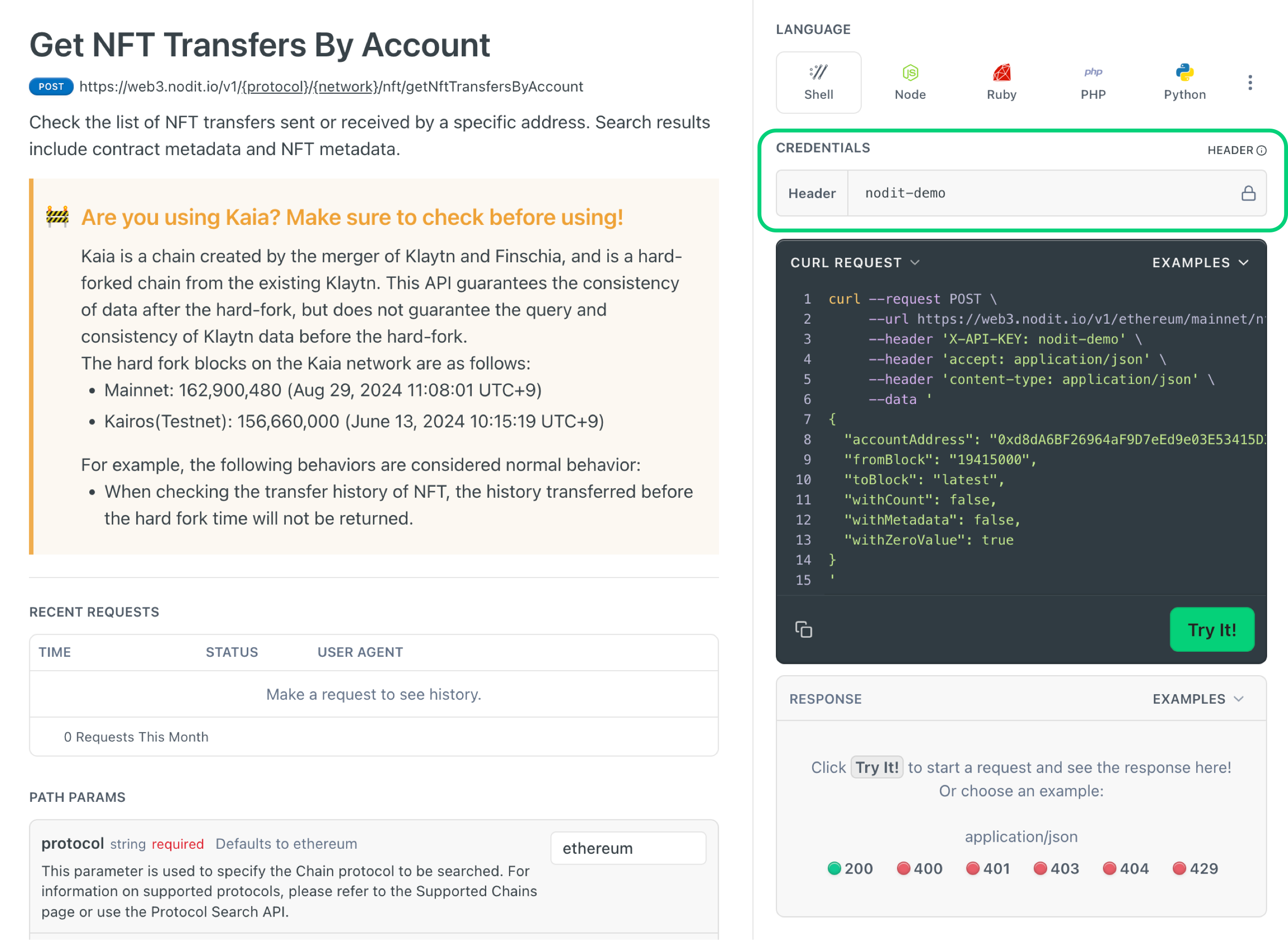
Test API calls with the parameters of your choice and inspect responses directly from the API Reference page — no development environment setup required. On the Data API page you want to test, enter your issued API Key in the CREDENTIALS area, then execute the API example.
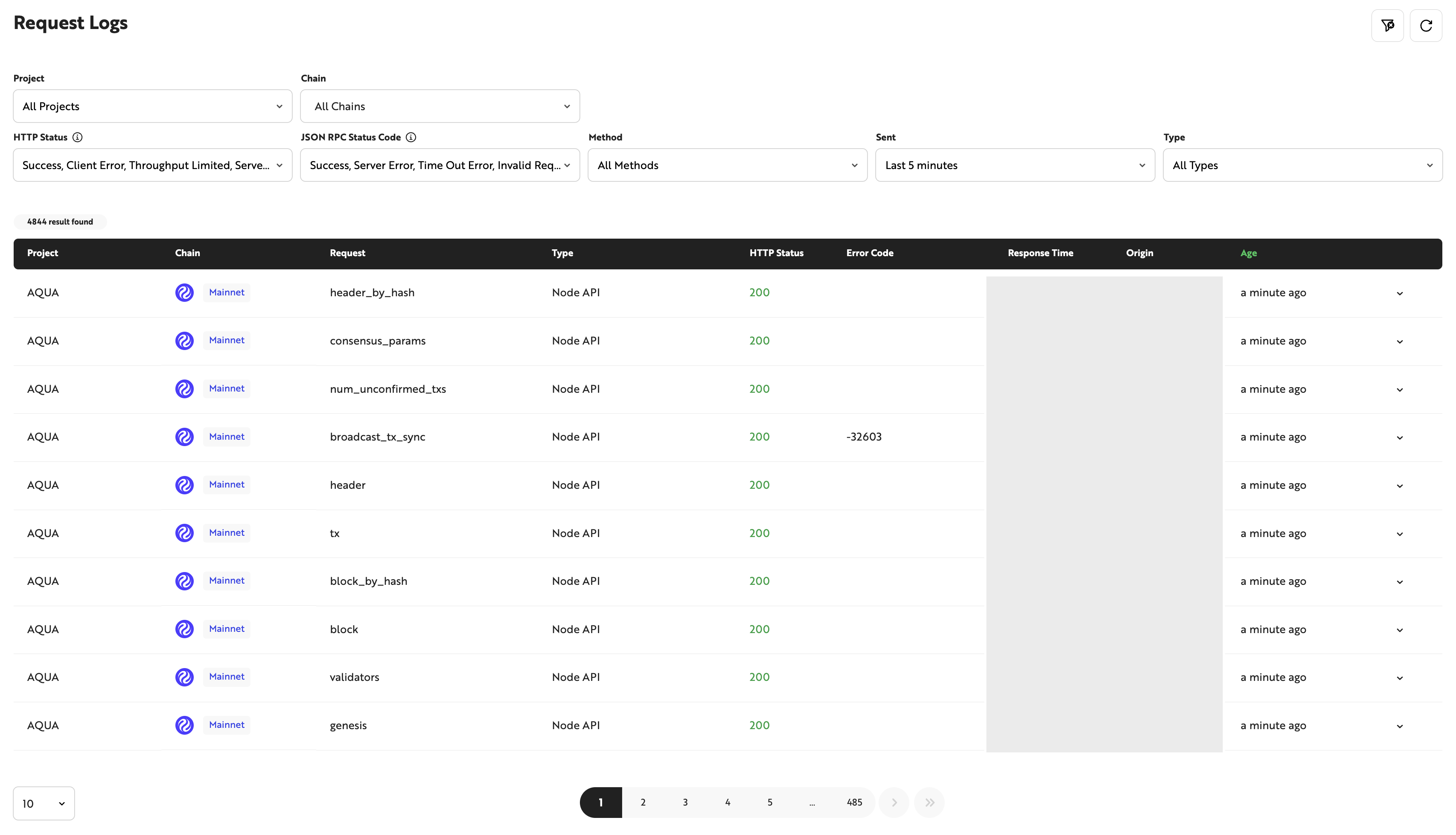
Use the Request Log feature to review and monitor Data API call history. Apply the METHOD filter to selectively view only Data API call records. Use various filters to isolate failed request history or review API usage by period.
Data API Quickstart
Follow the steps below to issue an API Key and make your first API call. Start with the Free Trial plan to receive an immediately available API Key. Follow the guide on the Get Started with Nodit page to locate your issued API Key in the Nodit Console.
Check API Call Example Code Using Templates
Click the button below to view simple Data API call example code. Use the example code when API calls are needed within your implementation.
(Aptos) Indexer API Call
For the Aptos Indexer API call guide, refer to the link below.