Stream Quickstart
What is Nodit Stream?
Nodit Stream is a service that allows you to subscribe to and receive desired on-chain events in real time from multiple networks through a bidirectional stream channel. Like Nodit Webhook, you can filter the data you want using the same EventType, but Stream differs from Webhook in that events are received through a synchronized WebSocket channel rather than an asynchronous channel.
Nodit Stream Endpoint
The WebSocket Endpoint for using Nodit Stream is as follows.
- wss://web3.nodit.io/v1/websocket
Yes, the WSS Endpoint shown on the network-specific cards in the Nodit console is the Endpoint for using the WebSocket communication provided by the Node Client itself. The Stream service is a feature that subscribes to refined data through a separate WebSocket server built by the Nodit team, similar to the Web3 Data API. It can be used through a single Endpoint regardless of the type of target network you want to query.
Stream Tutorials
1. Environment Setup
In this example, JavaScript is used to implement the WebSocket connection code. To follow along with this example, the following steps must be completed first.
1-1. Install Node.js
Node.js is a JavaScript runtime that supports running various JS applications. Click the link below to install Node.js. Although multiple versions are available, it is recommended to install the latest LTS version for stable use.
1-2. Install socket.io-client
socket.io-client is a library for real-time WebSocket-based communication used on the client side. It is used to connect to a server and send/receive real-time data and events. If Node.js is installed, you can easily install it using the terminal and a command. Enter the following command in the terminal at the Root Directory path where you want to implement WebSocket.
npm install socket.io-client
1-3. Sign up for Nodit Console
Nodit provides a Node service that can connect to various blockchain networks. Click the link below to access the Nodit Console and sign up.
1-4. API key
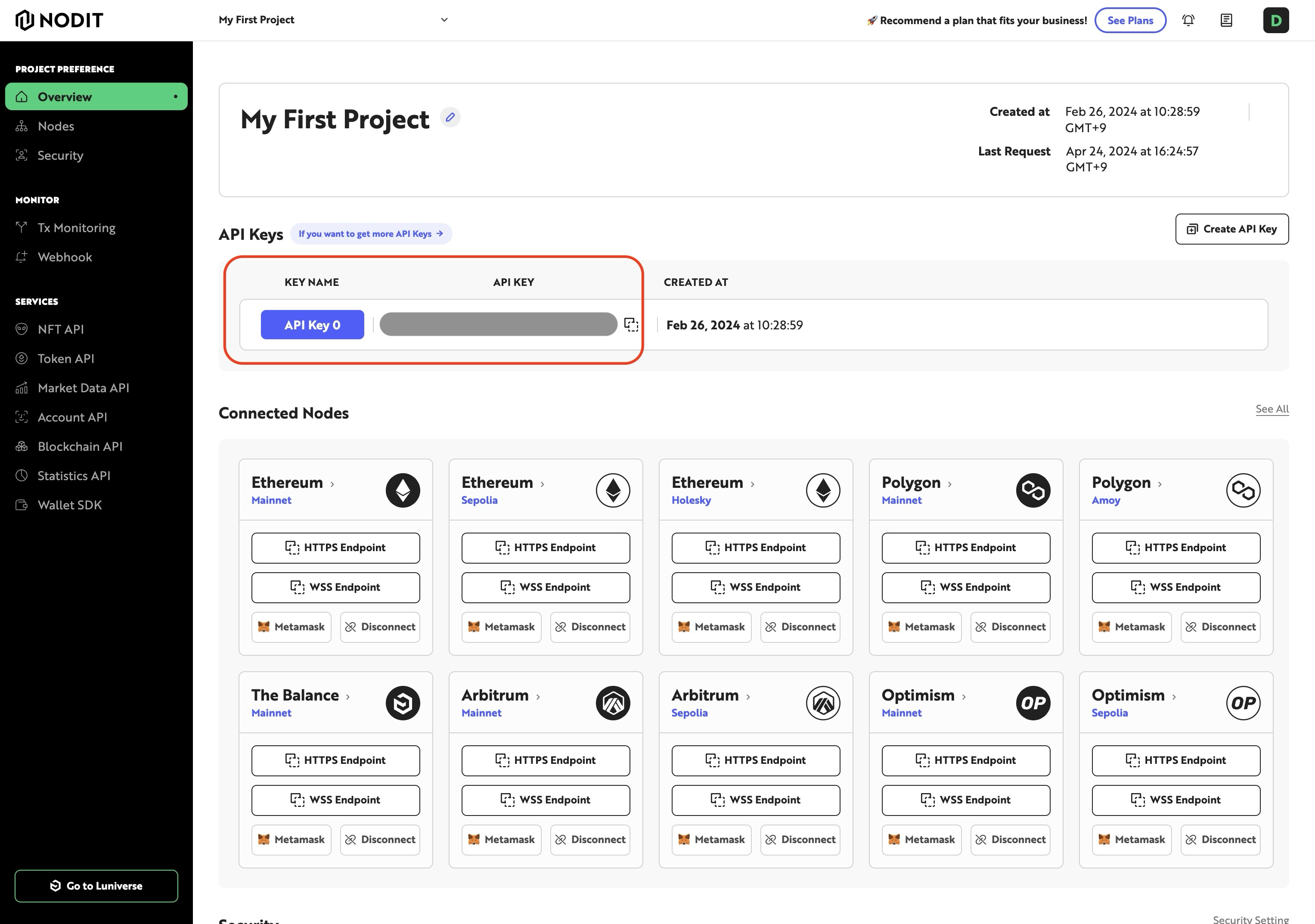
Copy the generated API key from the Project Overview page and store it in a safe place.
2. Writing the Code
In this example, we write code that subscribes to the BLOCK_PERIOD event using WebSocket and receives a notification every time a block is created. In the sample code below, enter the required values for several variables. These variables play an important role in configuring the WebSocket code to operate correctly and securely. Replace the data appropriately to match your actual environment.
messageId: A unique identifier for the WebSocket message. It must be replaced with an actual ID relevant to your application. The message ID is used to distinguish specific messages or events between the server and client.description: This variable contains a brief description of the purpose of the WebSocket connection. It should be replaced with content describing the actual purpose of the connection. This description helps easily identify the connection in service logs, monitoring, or troubleshooting.apiKey: Must be replaced with the actual API key provided by the Nodit console. The API key is an essential element for securely accessing the service and verifying user authentication.protocol: This variable represents the blockchain protocol the user is interacting with. It should be replaced with a specific protocol name such as "Ethereum", "Arbitrum", etc. The protocol defines which blockchain technology the WebSocket connection interacts with.network: This variable specifies the target network. It should be replaced with a specific network such as "mainnet", "testnet", "sepolia", etc. The network specifies the particular environment within the protocol where actual data is transmitted.
import io from "socket.io-client";

// {Your websocket message ID} - This is a unique identifier for your WebSocket message. You need to replace this placeholder with an actual ID that is relevant to your application.
const messageId = "{Your websocket message ID}";

// eventType specifies the type of event you want to subscribe to on the blockchain. For example, "BLOCK_PERIOD" could be used to receive events related to blockchain block timings.
const eventType = "BLOCK_PERIOD";

// The WebSocket URL to connect to. You need to use the appropriate URL provided by your blockchain service provider.
const url = "wss://web3.nodit.io/v1/websocket";

// Parameters for configuring the subscription. You should replace the placeholder in 'description' with a brief description of your WebSocket connection's purpose.
const params = {
  description: "{description about your websocket}",
  condition: {
    period: 1 // You can set this to any integer greater than zero. This could be used to specify the frequency of events, such as receiving an event every 'n' blocks.
  }
};

// Options for the WebSocket connection. These include security settings and additional parameters required by the server.
const options = {
  rejectUnauthorized: false, // This should be true in production for better security unless your server uses a self-signed certificate.
  transports: ["websocket"],
  path: "/v1/websocket/",
  auth: {
      apiKey: "{Your Api Key}", // Replace this with your actual API key provided by the service.
  },
  query: {
      protocol: "{protocol}", // Replace this with the blockchain protocol you are interacting with, e.g., "ethereum", "arbitrum", etc.
      network: "{network}", // Replace this with the specific network you are targeting, e.g., "mainnet", "testnet".
  },
};

// This function establishes a connection to the server and handles various WebSocket events.
function connectToServer() {
  return new Promise((resolve, reject) => {
    const socket = io(url, options);

    socket.on("connect", () => {
      socket.on("subscription_registered", (message) => {
        console.log("registered", message);
      });

      socket.on("subscription_connected", (message) => {
        console.log("subscription_connected", message);

        // Emit a subscription message with your specific messageId, eventType, and parameters.
        socket.emit("subscription", messageId, eventType, JSON.stringify(params));
      });

      socket.on("subscription_error", (message) => {
        console.error(`nodit_subscription_error: ${message}`);
      });

      socket.on("subscription_event", (message) => {
        console.log("subscription Event : ", message);
      });

      socket.on("disconnect", (message) => {
        console.warn(`disconnect`, message);
      });

      resolve(socket);
    });

    socket.on("connect_error", (error) => {
      console.error(`Socket connection error to : `, error);
      reject(error);
    });
  });
}

connectToServer();
3. Running and Checking the Response
Once the code is written as above, run the file using the terminal and Node.js.
node your_file_name.js
After running, if the example WebSocket is successfully connected to the Ethereum network, you will receive events as follows every time a block is created.
subscriptionId: 97139
subscription Event :
  eventType: "BLOCK_PERIOD",
  event: {
    "period":1,
    "message":{
      "number":17767702,
      "hash":"0x836c2ada70123019592fc52763757c87061935bbab2609d2dac1d0e9a93a6186",
      "parent_hash":"0xc8936f4c504b1640df7e1c920dbd1879a0906c7d44cf369d7f26b2939bfa2864",
      "nonce":"0x0000000000000000",
      "sha3_uncles":"0x1dcc4de8dec75d7aab85b567b6ccd41ad312451b948a7413f0a142fd40d49347",
      "logs_bloom":"0x1d374002c00c144a39093818900082b050884050220a14960209123380de5e80c4581182411812b173505850b0b5818112ad99b88dcf39abc651fc95d5ed2b04649070b87fa209ccbe23c02fc829b16c9c804020016e0c8b20805f42cc611800da80041507d304350971a2476d921a8db9934bcc290e0549d68d13f014082f062e3a92d03692002012d0704842a08800f9050d835910246c56aa4153a81134308ef82dc47101fec2601329e7f05414a2860c003f226d86ee8221276610108c5d89548da24018c10e261ca6422096378c0d7903076328129800d520868a11e846c1ffb1a904c68590034524c47c818c2480e137be5b1e44e268198af3b6023d89",
      "transactions_root":"0xed72506de019800931029aa7f4efdb255b9a6c2ebab2751afd98e3d2875e4159",
      "state_root":"0x35ee38917ecf6a96f9512690b4717002f233dd0dfe08f404097c0eff91f4aa20",
      "receipts_root":"0x59f4b1fc17aa8e408eec5377f4b37314333476229b350fe4b4549868ba8c7fdc",
      "miner":"0x1f9090aae28b8a3dceadf281b0f12828e676c326",
      "difficulty":0,
      "total_difficulty":5.875000371659836e+22,
      "size":58801,
      "extra_data":"0x7273796e632d6275696c6465722e78797a",
      "gas_limit":30000000,
      "gas_used":11663189,
      "timestamp":1690258955,
      "transaction_count":107,
      "base_fee_per_gas":17895212572
    }
  }
The Nodit Developer Portal provides Recipes so you can view the WebSocket call code in more detail! Click the link below to check it out!