Webhook Quickstart
What is Nodit Webhook?
Nodit Webhook lets you define on-chain events to track and register them in advance. When those events occur, the Nodit server calls your Webhook endpoint and sends the event data. You can receive event occurrence and details asynchronously in real time via your backend endpoint, so you can monitor user actions, token activity, and transaction status effectively. You can create and use a Webhook as follows.
- Implement an endpoint to receive Webhooks.
- Create the Webhook via the Nodit console or API:
- 2-1. Choose the network to monitor and define the event type to track.
- 2-2. Enter the Webhook endpoint URL from step 1.
- (Optional) Update or delete the Webhook configuration.
As of May 30, 2025, the Instant Webhook option lets you receive Webhook messages as soon as the event is detected by the Nodit node, regardless of block finality. It is suitable when you need immediate reaction and fast notification rather than confirmation. Use it in applications where quick feedback matters: user action tracking, UI responsiveness, or proactive risk detection.
With Instant Webhook disabled, messages are sent only after the block containing the event is finalized, as with the original Webhook behavior. If blocks are reorganized or rolled back, the event might not be final; for use cases where data finality is important, we recommend keeping the option disabled.
💡 When creating or querying Webhooks via the API, set the isInstant field to true or false to enable or disable the option.
As of May 20, 2025, Nodit plan policy changed. For Starter plan users, created Webhooks remain active for up to 9 days. After 9 days from creation or last reactivation, Webhooks are automatically disabled at UTC 00:00:00. An email is sent to the account 2 days before disablement. You can reactivate a disabled Webhook from the console Webhook menu or via the API; after reactivation it is active for up to 9 days again.
For continuous use, check the Webhook status periodically and reactivate when needed, or consider upgrading your plan for longer active periods.
Webhook API usage example
1. Environment setup
1-1. Sign up for Nodit Console
Nodit provides node services for multiple blockchain networks. Sign up via the link below.
1-2. Get a Webhook Listener endpoint
To create a Webhook you need a server that will receive notifications. This server receives and processes external event notifications. For production you should run your own Webhook listener; for this example we use a third-party service to inspect Webhook payloads.
[Third-party service examples]
-
Postman Mock server: You can mock APIs and get a temporary URL that accepts Webhook requests. See: Set up Postman Mock server.
-
Webhook.site: Webhook.site captures and displays Webhook data in real time. You can start testing without running your own server. Use the link below to get a free listener URL. ▶︎ Webhook.site
This example uses Webhook.site. Open the site and copy the unique URL provided.

2. Create a Webhook
You can subscribe to events via the console or the Webhook API. This example creates a Webhook that subscribes to BLOCK_PERIOD using the API.
- X-API-KEY: Use your real API key from the Nodit console. The API key is required for authentication and secure access.
- webhookUrl: The Webhook Listener endpoint that will receive event notifications. Paste the URL you copied above.
curl --request POST \
     --url https://web3.nodit.io/v1/ethereum/mainnet/webhooks \
     --header 'X-API-KEY: {Your API key}' \
     --header 'accept: application/json' \
     --header 'content-type: application/json' \
     --data '
{
  "eventType": "BLOCK_PERIOD",
  "description": "Webhook Test",
  "notification": {
    "webhookUrl": "{Your webhook listener endpoint}"
  },
  "condition": {
    "period": 1
  }
}
'
When the request succeeds, the response includes a success message and the subscription ID. Example:
{
  "subscriptionId": "2361",
  "description": "Webhook test",
  "protocol": "ETHEREUM",
  "network": "MAINNET",
  "eventType": "BLOCK_PERIOD",
  "notification": {
    "webhookUrl": "https://example.com/webhook"
  },
  "signingKey": "cd5...d12",
  "condition": {
    "period": 1
  },
  "createdAt": "2024-04-29T08:04:11.098Z"
}
3. Verify delivery on your Webhook Listener
Once the Webhook is created, Nodit sends a notification to your listener whenever the subscribed event occurs. Below is an example of a notification as seen on Webhook.site.
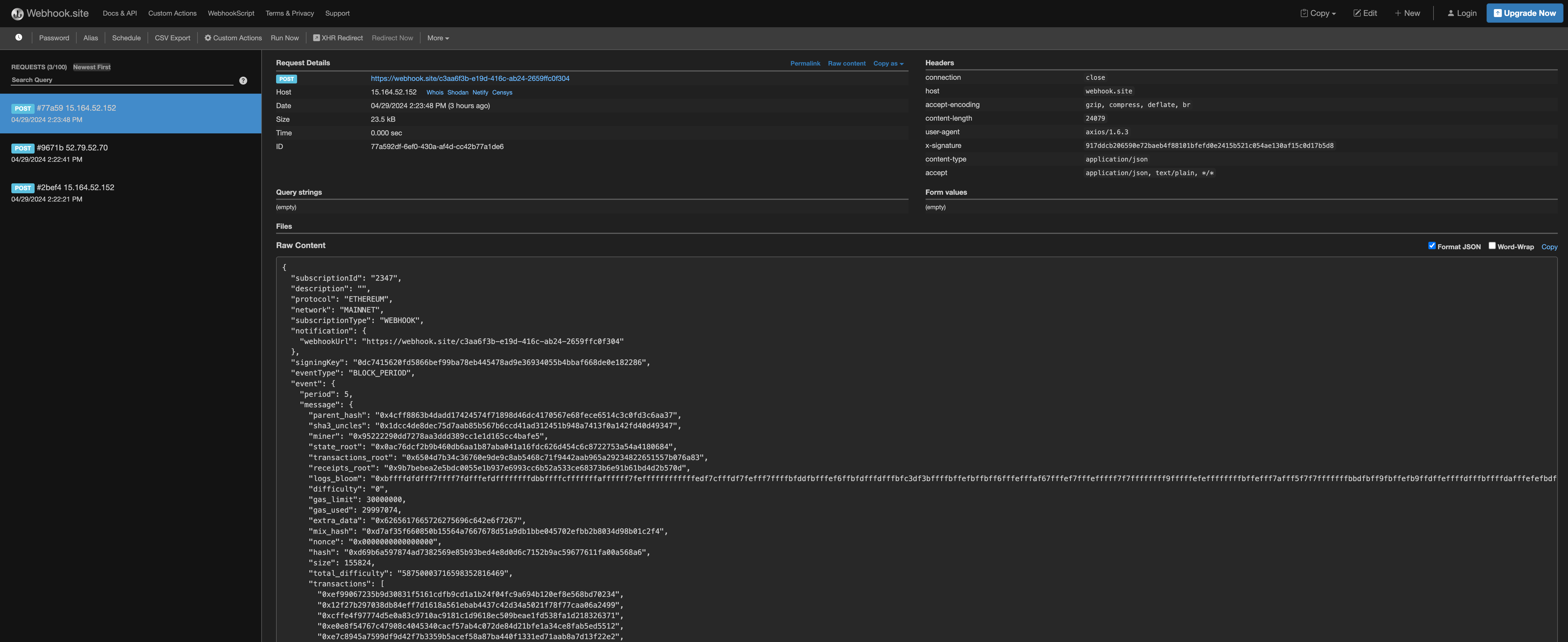
{
  "subscriptionId": "2347",
  "description": "Webhook test",
  "protocol": "ETHEREUM",
  "network": "MAINNET",
  "subscriptionType": "WEBHOOK",
  "notification": {
    "webhookUrl": "https://webhook.site/c3aa6f3b-e19d-416c-ab24-2659ffc0f304"
  },
  "signingKey": "0dc...286",
  "eventType": "BLOCK_PERIOD",
  "event": {
    "period": 5,
    "message": {
      "parent_hash": "0x4cff8863b4dadd17424574f71898d46dc4170567e68fece6514c3c0fd3c6aa37",
      "sha3_uncles": "0x1dcc4de8dec75d7aab85b567b6ccd41ad312451b948a7413f0a142fd40d49347",
      "miner": "0x95222290dd7278aa3ddd389cc1e1d165cc4bafe5",
      "state_root": "0x0ac76dcf2b9b460db6aa1b87aba041a16fdc626d454c6c8722753a54a4180684",
      "transactions_root": "0x6504d7b34c36760e9de9c8ab5468c71f9442aab965a29234822651557b076a83",
      "receipts_root": "0x9b7bebea2e5bdc0055e1b937e6993cc6b52a533ce68373b6e91b61bd4d2b570d",
      "logs_bloom": "0xbffffdfdfff7ffff7fdfffefdffffffffdbbffffcfffffffaffffff7feffffffffffffedf7cfffdf7fefff7ffffbfddfbfffef6ffbfdfffdfffbfc3df3bffffbffefbffbff6fffefffaf67fffef7fffefffff7f7ffffffff9fffffefeffffffffbffefff7afff5f7f7fffffffbbdfbff9fbffefb9ffdffeffffdfffbffffdafffefefbdffdffff7ef8fdfffbffffffffffbfdfbf7ff6f7fffffbebefffdfffffbeffdfff9fdfef7fafffffffffffffefbeffffffffffffffffdffffdbfe7fbfff7fdffffbfffcfdb7fffffffbffffbffffbffffefffddffff7fefffadffffffbfffffffffffffdeffbedfdf7bf1fbdffafffffefffdffffff7fdfffeffbffffd",
      "difficulty": "0",
      "gas_limit": 30000000,
      "gas_used": 29997074,
      "extra_data": "0x6265617665726275696c642e6f7267",
      "mix_hash": "0xd7af35f660850b15564a7667678d51a9db1bbe045702efbb2b8034d98b01c2f4",
      "nonce": "0x0000000000000000",
      "hash": "0xd69b6a597874ad7382569e85b93bed4e8d0d6c7152b9ac59677611fa00a568a6",
      "size": 155824,
      "total_difficulty": "58750003716598352816469",
      "transactions": [
        "0xef99067235b9d30831f5161cdfb9cd1a1b24f04fc9a694b120ef8e568bd70234",
				// ... snip
        "0x586442f7566519e7e3f026bfd318a65f559783cafe0f5a9b3162dc7f50c0d6cb"
      ],
      "transaction_count": 318,
      "log_count": 1548,
      "base_fee_per_gas": 5838584039,
      "withdrawals_root": "0xc0419b57a2665a2682834b323193cdbc56f13698aed0467a028b586ae9720488",
      "withdrawal_count": 16,
      "blob_gas_used": "0x0",
      "excess_blob_gas": "0x60000",
      "parent_beacon_block_root": "0x40735f721e4de4c63825f5885795ade7ac314a8502953ef14c074b64b70b2b4e",
      "type": "block",
      "number": 19758850,
      "timestamp": 1714368119
    }
  },
  "createdAt": "2024-04-29T05:23:46.838Z"
}
For Webhooks on the Kaia chain, payload structure and some field formats may differ from other Ethereum-style chains. This is to preserve chain-specific data. Kaia Webhook payloads follow the node’s kaia namespace API response format. For example, the transaction_type field in transaction-related Webhook payloads:
- Ethereum:
transaction_type: 2 (Number) - Kaia:
transaction_type: "TxTypeEthereumDynamicFee" (String)
4. Update and query Webhooks
Next we update the Webhook and then delete it permanently.
Nodit lets you pause Webhook notifications. When paused, the Webhook is not deleted; only delivery is stopped. Run the script below and set isActive to false. (Use a valid SUBSCRIPTION_ID and YOUR_API_KEY.)
curl --request PATCH \
     --url https://web3.nodit.io/v1/ethereum/mainnet/webhooks/{SUBSCRIPTION_ID} \
     --header 'X-API-KEY: {YOUR_API_KEY}' \
     --header 'accept: application/json' \
     --header 'content-type: application/json' \
     --data '{
     "isActive":false
}'
A response with "result": true means the update succeeded.
{
  "result": true
}
To confirm the change, query the Webhook. (Use a valid SUBSCRIPTION_ID and YOUR_API_KEY.)
curl --request GET \
     --url 'https://web3.nodit.io/v1/ethereum/mainnet/webhooks?subscriptionId={SUBSCRIPTION_ID}' \
     --header 'X-API-KEY: {YOUR_API_KEY}' \
     --header 'accept: application/json'
{
  "total": 1,
  "rpp": 10,
  "page": 1,
  "items": [
    {
      "subscriptionId": "2361",
      "description": "webhook Test",
      "environmentId": "9999999999999999999",
      "protocol": "ETHEREUM",
      "network": "MAINNET",
      "subscriptionType": "WEBHOOK",
      "eventType": "BLOCK_PERIOD",
      "notification": {
        "webhookUrl": "https://example.com/webhook"
      },
      "signingKey": "0a2...2fd",
      "isActive": false,
      "updatedAt": "2024-04-29T08:20:20.000Z",
      "createdAt": "2024-04-29T08:17:21.826Z",
      "condition": {
        "period": 1
      }
    }
  ]
}
5. Delete a Webhook
Finally, delete the Webhook. Deletion cannot be undone and stops all configuration and delivery for that Webhook. Use the script below to delete the Webhook created in this example.
curl --request DELETE \
     --url https://web3.nodit.io/v1/ethereum/mainnet/webhooks/{SUBSCRIPTION_ID} \
     --header 'X-API-KEY: {YOUR_API_KEY}' \
     --header 'accept: application/json'
A response with "result": true means the deletion succeeded.
{
  "result": true
}
Webhook retry policy
Nodit Webhook supports up to 1 retry. If the call to your webhookUrl does not receive a 200 OK response, Nodit retries the delivery 15 seconds after the initial attempt.