Flexible Webhook Security & Reliability
A Webhook Endpoint is a public URL accessible from the outside. Since anyone can send requests without authentication, it is exposed to threats such as message tampering and replay attacks. This document covers the security threats to consider when operating an endpoint, best practices, and reliability strategies to prevent message loss.
Security Threats
Replay Attack
An attack where an attacker resends a captured request multiple times to cause duplicate processing. For example, if the same webhook message is delivered repeatedly, a payment request may be processed more than once or data consistency may be broken. To prevent this, implement your business logic to be idempotent.
Man-In-The-Middle (MITM) Attack
An attack where an attacker intercepts communication between the client and server to eavesdrop on data or tamper with the payload. Protect the communication channel with HTTPS/TLS, and defend against this by verifying signatures to authenticate message integrity and origin.
Best Practices
Apply the following guidelines to minimize threats such as Replay and MITM attacks. Each item is optional and can be applied selectively.
Verify Message Integrity Using Signatures
The Nodit server includes a signature value in the x-signature header of every webhook message. By verifying the signature with the Signing Key on your endpoint server, you can confirm the integrity and origin of the message.
What is a Signature?
A value generated by hashing the original data using an algorithm such as HMAC-SHA256 and creating a message authentication code (MAC) with a pre-shared secret key. If the key is shared between sender and receiver, integrity can be verified through the following process:
- The sender transmits the original data along with the signature.
- The receiver decrypts the signature using the secret key to obtain the Digest. Successful decryption authenticates the sender.
- The receiver independently computes a Hash from the received data to produce a Digest.
- If the Digest from step (2) matches the Digest from step (3), the data has not been tampered with.
Retrieve the Signing Key
The Signing Key is automatically generated when a webhook is created. The same key is used within the same webhook.
Flexible Webhook is a console-only feature. The Signing Key can only be viewed in the console.
View the Signing Key in the Console
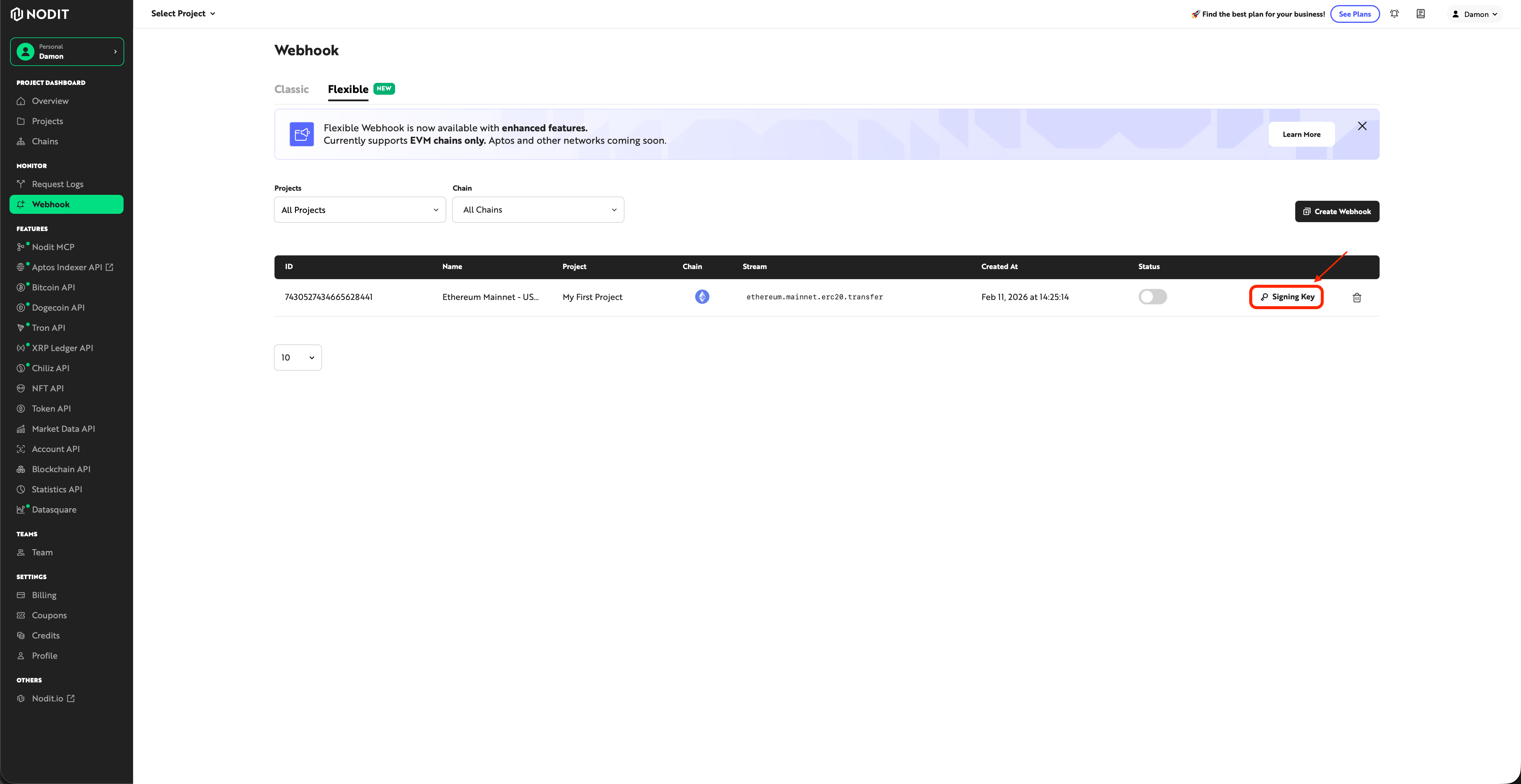
Click the [Signing Key] button in the Webhook menu to view it.
Verify the Nodit Webhook Message Signature
When receiving a webhook message, extract the signature value from the x-signature header and validate it using the Signing Key. Below are example code snippets in various languages.
const crypto = require('crypto');

/**
 * Validate the signature using the request body, header signature, and signing key.
 *
 * @param {Object} body - The request body (JSON object)
 * @param {string} signature - The signature string from the x-signature header
 * @param {string} signingKey - The signing key retrieved from Nodit console
 * @returns {boolean} Returns true if the signature is valid, otherwise false
 */
function isValidSignature(body, signature, signingKey) {
  const hmac = crypto.createHmac('sha256', signingKey);
  hmac.update(JSON.stringify(body), 'utf8');
  return signature === hmac.digest('hex');
}

// --- Usage Example ---

// Flexible Webhook payload format
const sampleBody = {
  "subscriptionId": "1234567890123456789",
  "sequenceNumber": 1,
  "streamId": "77",
  "streamSlug": "ethereum.mainnet.erc20.transfer",
  "data": {
    "block_number": 21000000,
    "block_timestamp": 1730000000,
    "from_address": "0x1111111111111111111111111111111111111111",
    "log_index": 42,
    "to_address": "0x2222222222222222222222222222222222222222",
    "token_address": "0xa0b86991c6218b36c1d19d4a2e9eb0ce3606eb48",
    "transaction_hash": "0xaaaaaaaaaaaaaaaaaaaaaaaaaaaaaaaaaaaaaaaaaaaaaaaaaaaaaaaaaaaaaaaa",
    "transaction_index": 15,
    "value": "1000000000000"
  }
};

// Replace with actual values from x-signature header and Nodit console
const signature = "YOUR_X_SIGNATURE_HEADER_VALUE";
const signingKey = "YOUR_SIGNING_KEY";

if (isValidSignature(sampleBody, signature, signingKey)) {
  console.log('Signature is valid.');
} else {
  console.log('Signature is invalid.');
}
import json
import hmac
import hashlib

def is_valid_signature(body, signature, signing_key):
    """
    Validate the signature using the request body, header signature, and signing key.

    :param body: The request body (JSON object)
    :param signature: The signature string from the x-signature header
    :param signing_key: The signing key retrieved from Nodit console
    :return: Returns True if the signature is valid, otherwise False
    """
    message = json.dumps(body, separators=(',', ':')).encode('utf-8')
    computed_signature = hmac.new(signing_key.encode('utf-8'), message, hashlib.sha256).hexdigest()
    return signature == computed_signature

if __name__ == '__main__':
    # Flexible Webhook payload format
    sample_body = {
        "subscriptionId": "1234567890123456789",
        "sequenceNumber": 1,
        "streamId": "77",
        "streamSlug": "ethereum.mainnet.erc20.transfer",
        "data": {
            "block_number": 21000000,
            "block_timestamp": 1730000000,
            "from_address": "0x1111111111111111111111111111111111111111",
            "log_index": 42,
            "to_address": "0x2222222222222222222222222222222222222222",
            "token_address": "0xa0b86991c6218b36c1d19d4a2e9eb0ce3606eb48",
            "transaction_hash": "0xaaaaaaaaaaaaaaaaaaaaaaaaaaaaaaaaaaaaaaaaaaaaaaaaaaaaaaaaaaaaaaaa",
            "transaction_index": 15,
            "value": "1000000000000"
        }
    }

    # Replace with actual values from x-signature header and Nodit console
    signature = "YOUR_X_SIGNATURE_HEADER_VALUE"
    signing_key = "YOUR_SIGNING_KEY"

    if is_valid_signature(sample_body, signature, signing_key):
        print("Signature is valid.")
    else:
        print("Signature is invalid.")
import javax.crypto.Mac;
import javax.crypto.spec.SecretKeySpec;
import java.nio.charset.StandardCharsets;

public class SignatureValidation {
    /**
     * Validate the signature using the JSON body, header signature, and signing key.
     *
     * @param body JSON string of the request body
     * @param signature The signature string from the x-signature header
     * @param signingKey The signing key retrieved from Nodit console
     * @return Returns true if the signature is valid, otherwise false
     */
    public static boolean isValidSignature(String body, String signature, String signingKey) throws Exception {
        Mac sha256HMAC = Mac.getInstance("HmacSHA256");
        SecretKeySpec keySpec = new SecretKeySpec(signingKey.getBytes(StandardCharsets.UTF_8), "HmacSHA256");
        sha256HMAC.init(keySpec);
        byte[] hashBytes = sha256HMAC.doFinal(body.getBytes(StandardCharsets.UTF_8));
        StringBuilder sb = new StringBuilder();
        for (byte b : hashBytes) {
            sb.append(String.format("%02x", b));
        }
        return sb.toString().equals(signature);
    }

    public static void main(String[] args) {
        try {
            // Flexible Webhook payload format
            String sampleBody = "{\"subscriptionId\":\"1234567890123456789\",\"sequenceNumber\":1,\"streamId\":\"77\",\"streamSlug\":\"ethereum.mainnet.erc20.transfer\",\"data\":{\"block_number\":21000000,\"block_timestamp\":1730000000,\"from_address\":\"0x1111111111111111111111111111111111111111\",\"log_index\":42,\"to_address\":\"0x2222222222222222222222222222222222222222\",\"token_address\":\"0xa0b86991c6218b36c1d19d4a2e9eb0ce3606eb48\",\"transaction_hash\":\"0xaaaaaaaaaaaaaaaaaaaaaaaaaaaaaaaaaaaaaaaaaaaaaaaaaaaaaaaaaaaaaaaa\",\"transaction_index\":15,\"value\":\"1000000000000\"}}";

            // Replace with actual values from x-signature header and Nodit console
            String signature = "YOUR_X_SIGNATURE_HEADER_VALUE";
            String signingKey = "YOUR_SIGNING_KEY";

            if (isValidSignature(sampleBody, signature, signingKey)) {
                System.out.println("Signature is valid.");
            } else {
                System.out.println("Signature is invalid.");
            }
        } catch (Exception e) {
            e.printStackTrace();
        }
    }
}
Save each code to a file and run it with the following commands.
node signatureValidation.js
python signatureValidation.py
javac SignatureValidation.java && java SignatureValidation
Securely Managing the Signing Key
The prerequisite for signature verification is the safe storage of the Signing Key.
- Do not hardcode in plaintext: Do not include it directly in source code or configuration files. Store it in an external repository and inject it at runtime.
- Use secret management services: Store and enforce access controls using services such as AWS Secrets Manager or Azure Key Vault.
- Minimize access privileges: Limit the users and applications that can access the Signing Key to the minimum necessary.
- Monitor access logs: Keep access records and set up detection for anomalous activity such as signature verification failures.
Implement Idempotency for Messages
Even if the same webhook message is delivered multiple times, your implementation must guarantee idempotency. For example, when sending a user notification in response to an asset transfer event, if the same event is received twice, only the first occurrence should be processed and subsequent messages should be ignored.
Use the following field combinations as Idempotency Keys per stream type.
Stream Type | Idempotency Key |
|---|---|
Block | `block_number` |
ERC-20 Transfer | `block_number` + `transaction_hash` + `log_index` |
ERC-721 Transfer | `block_number` + `transaction_hash` + `log_index` |
ERC-1155 Transfer | `block_number` + `transaction_hash` + `log_index` + `batch_index` |
Log | `block_number` + `transaction_hash` + `log_index` |
Transaction Receipt | `block_number` + `hash` |
Store Idempotency Keys in a cache such as Redis or a database to identify duplicate messages.
Reliability
Ensures messages are not lost even during endpoint downtime or processing delays.
Webhook Retry Policy
Nodit Webhook automatically retries up to 1 time. If a 200 OK response is not received after calling the webhookUrl, it retries after 15 seconds. Messages that fail even after retry can be confirmed as FAILED status in the console delivery history.
Manual Resend with Easy Resend
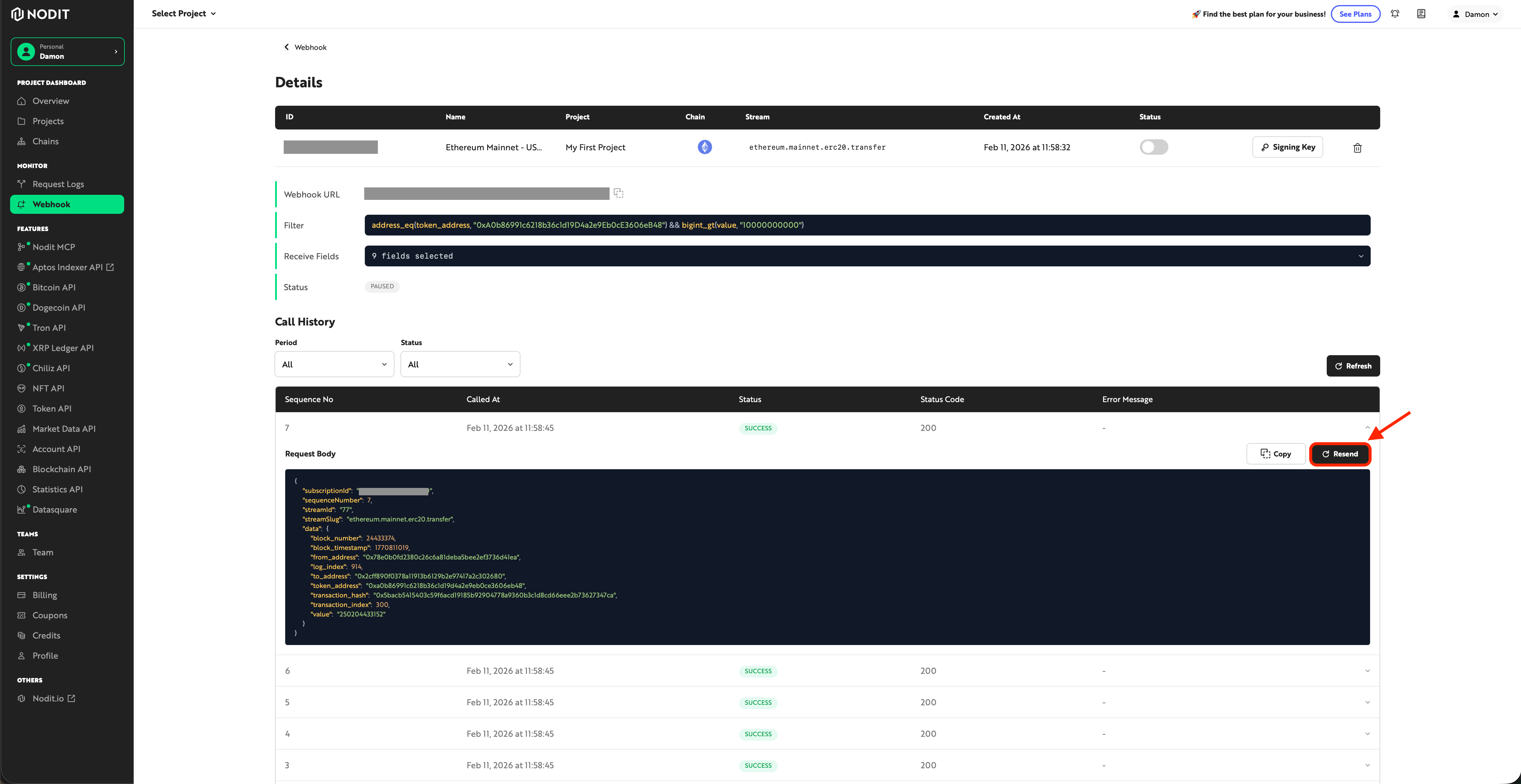
Messages that failed automatic retry can be manually resent from the console.
- Check the delivery history on the Webhook detail page.
- Select the FAILED message.
- Resend it using the Resend button.
- Verify the resend result immediately.
Retry records are not saved in the history.
Best Practices
Monitor Endpoint Availability
If endpoint downtime occurs, messages may be lost even after the automatic retry (1 time).
- Operate a health check endpoint to confirm the availability of the listener server.
- Integrate an alerting system (PagerDuty, Slack, etc.) for immediate response during downtime.
Track Failed Messages in the Console
Flexible Webhook does not support the Get Webhook History API. Check failed messages in the console.
- Regularly review FAILED messages.
- Analyze failure causes (response codes, timeouts, etc.) to prevent recurrence.
- Use Easy Resend for manual retransmission when needed.
Guarantee Idempotency (Prevent Duplicates on Resend)
The same message may be delivered multiple times through automatic retries or Easy Resend. Use the Idempotency Key from the idempotency implementation to prevent duplicate processing.