Nodit for AI - LLM Tools 🤖
You can integrate Nodit more easily and quickly using AI and LLM tools. Check out the various AI integration methods supported by Nodit developer documentation.
Using Nodit Developer Docs
Full-Documentation Exploration with LLMs.txt
LLMs.txt is a standard format that helps LLMs recognize the page list and main descriptions of the entire documentation at once. The LLMs.txt file for exploring Nodit developer documentation can be found at https://developer.nodit.io/llms.txt. You can register this link in the context of AI tools or LLMs to quickly explore the structure and page contents of the entire Nodit developer documentation.
Using Nodit MCP(Model Context Protocol)
You can directly integrate Nodit MCP with AI tools or LLMs so that AI can directly query API References and utilize data by calling them in real-time. This method goes beyond document-based integration that helps you learn Nodit's features and get help with development, allowing AI to directly understand and execute Nodit like an AI Agent. Nodit currently supports Local MCP Server, and plans to additionally support Remote MCP Server in July 2025. For detailed information and integration methods regarding Nodit MCP, please refer to the Nodit for AI - Nodit MCP✨ page.
Using AI-Powered IDEs
How to Add Nodit Docs to Cursor Context
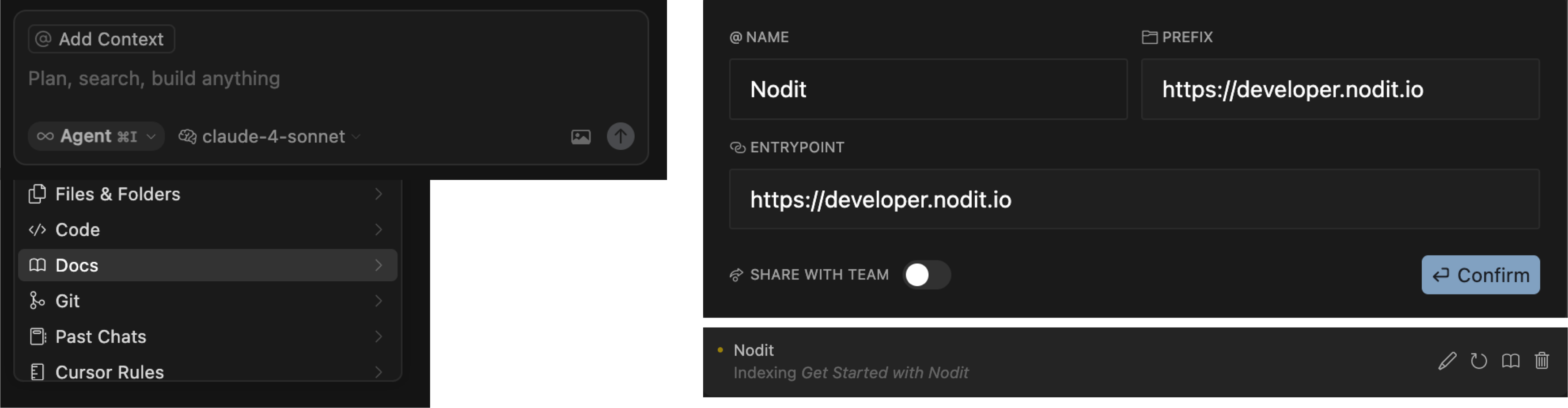
In addition to MCP, you can add the documentation itself as context to the AI IDE to use it as background knowledge during the development process. As shown in the image above, click the [@Add Context] button in the AI chat window and select Docs from the dropdown menu. When you enter the Nodit developer documentation URL (https://developer.nodit.io) in the Entry Point, Cursor IDE will start indexing the entire Nodit documentation pages as shown at the bottom. Through this method, you can reference it in real-time and utilize it for code implementation without directly tracking changes to the documentation.